Building Background Music Sets for Focused Work
In an open-plan office, one person’s energizing playlist is another person’s distraction. The problem isn’t music itself; it’s that background sound has to serve a specific task, a specific room, and a specific listener. That’s why so many hybrid workers now build their own work sets instead of relying on whatever the office speaker is playing. A personal work set is a small, deliberate collection of tracks chosen for concentration, not for parties or commutes.
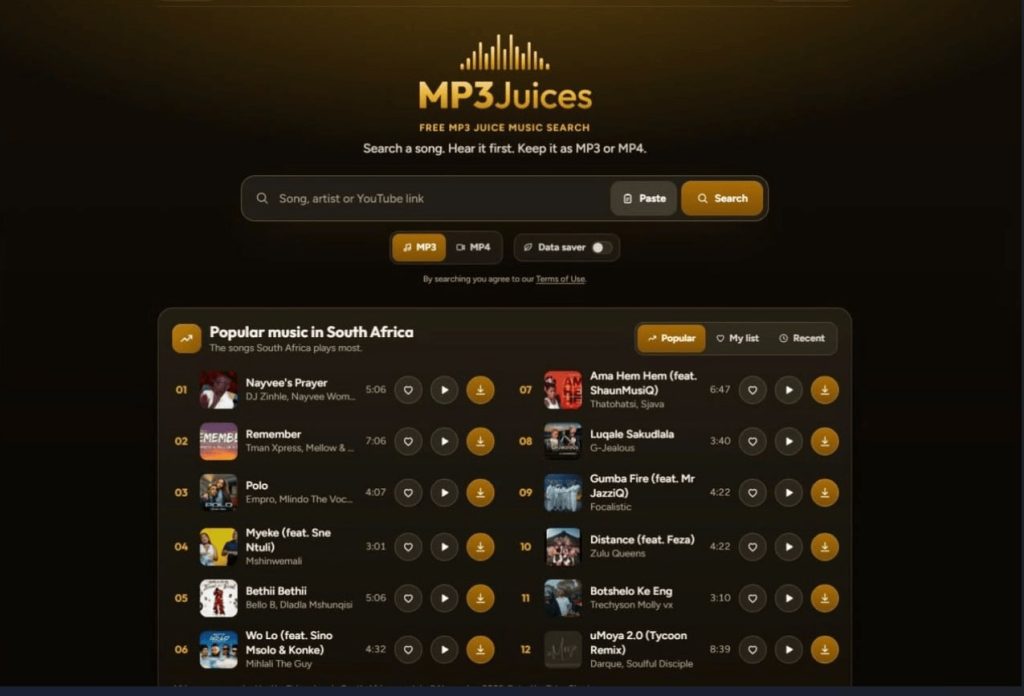
If you’re assembling one from scratch, mp3juices.art is a practical starting point: it lets you search for songs, preview them before committing, and download audio or video files without an account. The preview step matters more than most people expect, because a track that sounds great on a commute can be exactly wrong for deep work.
This is a guide to the craft of building those sets: choosing tempo, auditioning tracks properly, organizing files so they’re actually usable, and refreshing the list before it goes stale. It closes with a short note on shared-office etiquette, because even personal playlists leak through headphones.
Why Background Music at Work Is Harder Than It Sounds
Foreground music demands attention. Background music has to do the opposite: occupy enough of the auditory channel to mask office noise, but not enough to compete with the task. That balance changes by task type. Writing and reading tolerate very little lyrical content; repetitive administrative work often benefits from more energy; creative brainstorming can handle more variety.
The second difficulty is that the same track behaves differently depending on the room. A track with a strong bassline disappears in a noisy open plan and becomes intrusive in a quiet home office. A sparse piano piece that feels calming at home can be drowned out entirely by a nearby meeting.
That’s why generic “focus playlists” underperform. They’re optimized for an average listener in an average room. A work set you build yourself can be tuned to your actual environment and your actual job. The goal is not the best music; it’s the least distracting music for this task.
Choosing Tempo and Texture for Concentration
Tempo is the most useful single variable to control, because it’s easy to hear and easy to sort. Most people find a steady mid-tempo range works for sustained tasks, while faster tracks suit short bursts of repetitive work and slower tracks suit reading and review. You don’t need exact beats per minute; you need three rough buckets: slow, steady, and driving.
Texture matters just as much. Dense arrangements with many competing instruments and vocals pull attention. Sparse arrangements with a consistent rhythm and minimal lyrical content recede into the background. Instrumental versions, ambient genres, and repetitive electronic structures tend to hold up better over long sessions than verse-chorus pop songs.
Match the Set to the Task, Not the Mood
A common mistake is building a set around how you want to feel rather than what you need to do. High-energy music can make a boring task tolerable, but it can also make careful proofreading harder. Build separate sets for separate work modes:
- Deep work: instrumental, slow to steady tempo, low dynamic range, no sudden vocals.
- Admin and email: steady tempo, mild energy, lyrics tolerable because the task is less language-heavy.
- Creative drafting: more variety, slightly higher energy, room for familiar songs that don’t demand novelty.
Three small sets beat one giant playlist. When everything lives in a single list, you end up skipping tracks, and skipping is itself a distraction.
Preview Before You Commit
The single biggest time-waster in playlist building is downloading files you’ve never actually heard. A title and an artist name tell you very little about whether a track will work as background sound. The intro might be perfect and the chorus might be unusable. Previewing solves this cheaply.
On mp3juices.art, the workflow is search, listen, then download. That order is the important part. You can audition a candidate track in the browser, decide whether its texture and tempo fit the set you’re building, and only then save it as an MP3 or MP4. Skipping the preview step is how people end up with folders full of tracks they never play.
A Quick Audition Checklist
You don’t need to listen to entire songs. Thirty to sixty seconds is usually enough if you listen for the right things:
- Does the track open with a consistent rhythm, or does it start with a long intro that breaks concentration?
- Are there vocals, and are they prominent enough to compete with reading or writing?
- Does the volume level stay roughly even, or does it swing between quiet and loud passages?
- Would you notice this track if it were playing? If yes, it’s foreground music, not background music.
Previewing also protects you from duplicate downloads. It’s easy to save three versions of the same song under slightly different titles; a ten-second listen catches that immediately.
Organizing Work Sets So They Stay Usable
A downloaded track is only useful if you can find it later. Most people’s music folders become a flat pile of files with inconsistent names, which makes rebuilding a set after a break slow and annoying. A little structure pays off quickly.
A simple folder scheme works better than a complex one. Separate folders by work mode, not by genre, because you choose music by task. Inside each folder, keep file names consistent, ideally artist first and title second. If you use a music player with playlists, export or save the playlist file alongside the folder so the order survives.
Keep a Shortlist and a Reject List
Two small habits save a lot of time. The first is a shortlist file: tracks you’ve previewed and liked but haven’t placed in a set yet. The second is a reject list: tracks that seemed promising but failed the audition. Writing down why a track failed, for example “vocals too prominent” or “tempo too fast for reading,” stops you from re-downloading the same unsuitable song months later.
MP3Juices includes a personal list feature that helps here, and its genre and artist browsing makes it easier to find adjacent tracks once you’ve identified a sound that works. The charts view is useful for discovery, but treat it as a source of candidates rather than a ready-made work set. Popularity tells you nothing about whether a track suits concentration.
Refreshing Your Sets Without Starting Over
Every work set has a shelf life. Familiarity is useful up to a point, because predictable music is less distracting, but eventually a track becomes so familiar that it starts to invite attention, or so repetitive that it grates. The trick is to refresh in small increments rather than rebuilding from scratch.
A practical routine is to swap out a handful of tracks each month. Replace the ones you’ve started skipping, keep the core that still works, and audition two or three new candidates. This keeps the set stable enough to remain a habit while preventing staleness.
Watch for Signs a Set Has Gone Stale
Staleness shows up as behavior, not as taste. You start skipping tracks before they end. You turn the volume down instead of off. You notice the music at moments when you should be absorbed in the task. Any of these signals means the set needs a refresh, not necessarily a replacement.
Seasonal changes matter too. Office noise levels rise and fall with attendance patterns, and a hybrid schedule means your listening environment may be different on different days. Some workers keep one set for office days and another for home days, which is a sensible use of the folder structure described above.
Shared-Office Etiquette for Personal Playlists
Personal work sets are personal, but headphones leak, and speakers in shared spaces are a different problem entirely. The basic rule is that your music should never become someone else’s background noise unless they’ve agreed to it.
In practice, that means using closed-back headphones in open-plan areas, keeping volume low enough that nearby colleagues can’t identify the track, and never assuming a shared speaker is yours to control. If you do play music out loud in a shared room, ask first and keep it instrumental and quiet. When in doubt, the person who wants silence should win.
One more consideration: notification sounds and video previews count as audio too. If you’re auditioning tracks during work hours, do it with headphones on, and avoid playing MP4 previews on a laptop speaker in a quiet room.
Frequently Asked Questions
Do I need an account to build a work set with MP3Juices?
No. The site is designed to work without an account or installation, so you can search, preview, and download files directly in the browser. That makes it convenient for quick auditioning during a work break.
Is it better to download MP3 or MP4 for background listening?
For audio-only background listening, MP3 is the simpler choice because the files are smaller and play in any music app. MP4 is useful when you want the video version, but it’s heavier and unnecessary if you only need sound.
How many tracks should a focused work set contain?
There’s no fixed number, but shorter sets tend to work better. A set of roughly ten to twenty tracks is long enough to avoid obvious repetition within a session and short enough that you can curate it carefully. Multiple small sets by task beat one large list.
Can I preview a song before downloading it?
Yes. Previewing is a core part of the workflow on mp3juices.art: you listen first, judge whether the track fits your task and tempo range, and only then download it. This avoids filling your folders with unsuitable files.
What is data saver mode for?
Data saver mode reduces the amount of data used while browsing and previewing, which is helpful on metered connections or mobile hotspots. It’s a practical option if you’re auditioning tracks away from reliable Wi-Fi.